

AspNet te RadioButtonList Kullanımı
Merhaba arkadaşlar bu makalemizde radioButtonList örneğini göreceğiz. Sayfamıza 1 adet label, textbox ve radiobuttonlist ekleyelim. Bu örneğimizde textbox a girilen değere, radiobuttonlistteki seçili oranı ekleyeceğiz. RadioButtonList in SelectedIndexChanged özelliğine aşağıdaki kodu yazacağız.
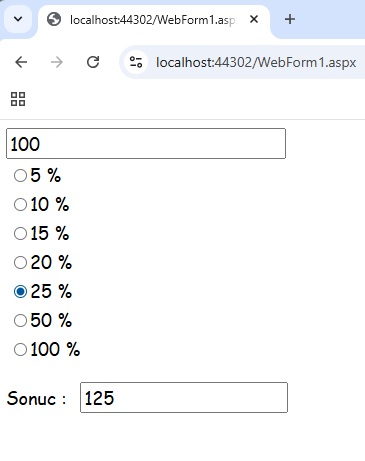
Sekil 1
WebForm1.aspx.cs
using System;
using System.Collections.Generic;
using System.Linq;
using System.Web;
using System.Web.UI;
using System.Web.UI.WebControls;
namespace aspnet_radiobuttonlist
{
public partial class WebForm1 : System.Web.UI.Page
{
protected void Page_Load(object sender, EventArgs e)
{
}
protected void RadioButtonList1_SelectedIndexChanged(object sender, EventArgs e)
{
int count = Convert.ToInt32(TextBox1.Text);
int addValue = Convert.ToInt32(RadioButtonList1.SelectedItem.Value);
int result = addValue + ((count * addValue) / 100);
txtResult.Text = result.ToString();
}
}
}
WebForm1.aspx
<%@ Page Language="C#" AutoEventWireup="true" CodeBehind="WebForm1.aspx.cs" Inherits="aspnet_radiobuttonlist.WebForm1" %>
<!DOCTYPE html>
<html xmlns="http://www.w3.org/1999/xhtml">
<head runat="server">
<title></title>
</head>
<body>
<form id="form1" runat="server">
<div>
<asp:TextBox ID="TextBox1" runat="server" Font-Names="Comic Sans MS" Font-Size="Large" Width="272px"></asp:TextBox>
<br />
<asp:RadioButtonList ID="RadioButtonList1" runat="server" AutoPostBack="True" Font-Names="Comic Sans MS" Font-Size="Large" Height="43px" Width="342px" OnSelectedIndexChanged="RadioButtonList1_SelectedIndexChanged">
<asp:ListItem Value="5">5 %</asp:ListItem>
<asp:ListItem Value="10">10 %</asp:ListItem>
<asp:ListItem Value="15">15 %</asp:ListItem>
<asp:ListItem Value="20">20 %</asp:ListItem>
<asp:ListItem Value="25">25 %</asp:ListItem>
<asp:ListItem Value="50">50 %</asp:ListItem>
<asp:ListItem Value="100">100 %</asp:ListItem>
</asp:RadioButtonList>
<br />
<asp:Label ID="Label1" runat="server" Font-Names="Comic Sans MS" Font-Size="Large" Text="Sonuc : "></asp:Label>
<asp:TextBox ID="txtResult" runat="server" Font-Names="Comic Sans MS" Font-Size="Large" Width="200px"></asp:TextBox>
</div>
</form>
</body>
</html>
Bir makalenin daha sonuna geldik. Bir sonraki makalede gorusmek uzere. Bahadir SAHIN