

TextBox a Girilen Verilerin DataTable Metodu İle DataGridView Nesnesine Eklenmesi
Merhaba arkadaşlar bu makalemizde veritabanı kayıt yapmadan textbox ta girilen verilerin dataTable metodu ile dataGridView nesnesinde eklenmesini ve gösterilmesini sağlayacağız. Ayrıca bu örneğimizde dataGridView nesnesinde seçili satırı kaldıracağız
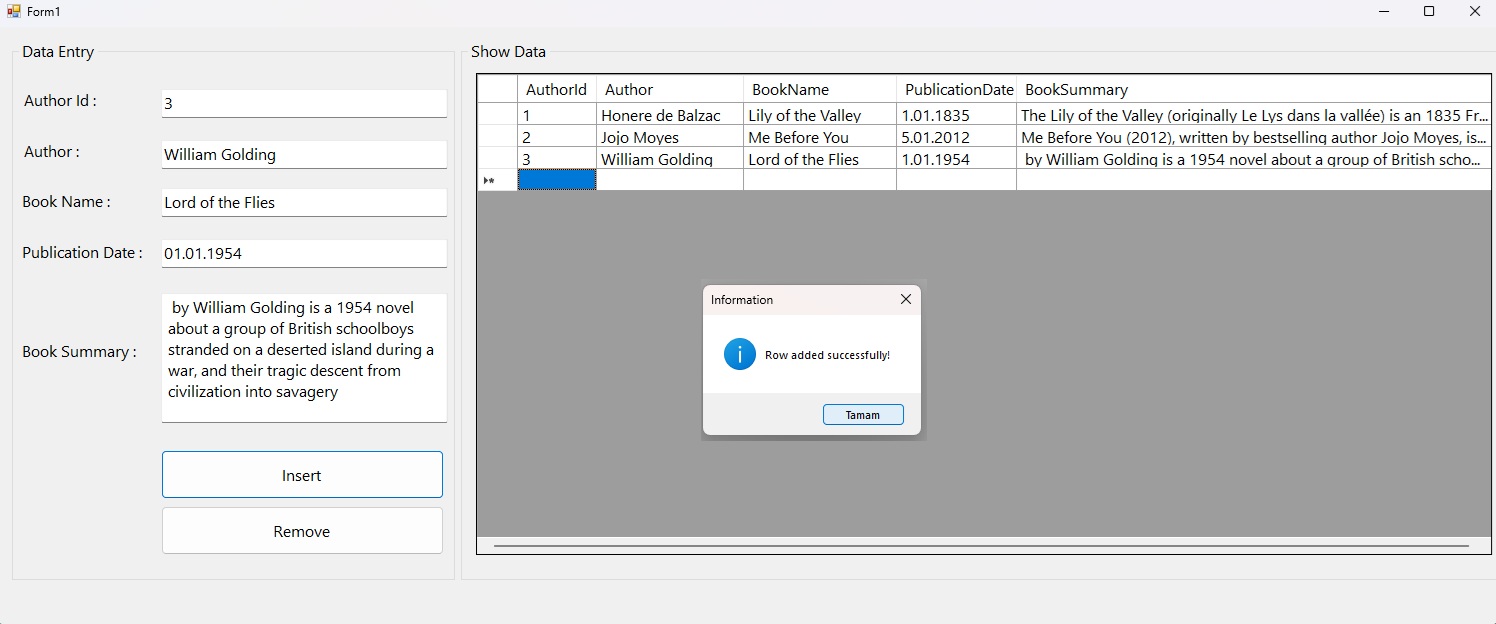
Şekil 1
Form1.cs
using System;
using System.Collections.Generic;
using System.ComponentModel;
using System.Data;
using System.Drawing;
using System.Linq;
using System.Text;
using System.Threading.Tasks;
using System.Windows.Forms;
using static System.Windows.Forms.VisualStyles.VisualStyleElement;
namespace datagridview_insert_delete_datatable_without_db
{
public partial class Form1 : Form
{
public Form1()
{
InitializeComponent();
}
DataTable dt = new DataTable();
private void Form1_Load(object sender, EventArgs e)
{
bindData();
}
private void btnAdd_Click(object sender, EventArgs e)
{
dt.Rows.Add(txtId.Text, txtAuthor.Text, txtBookName.Text, txtPublicationDate.Text, txtBookSummary.Text);
dataGridView1.DataSource = dt;
MessageBox.Show("Row added successfully!","Information", MessageBoxButtons.OK, MessageBoxIcon.Information);
}
void bindData()
{
dt.Columns.Add("AuthorId", typeof(int));
dt.Columns.Add("Author", typeof(string));
dt.Columns.Add("BookName", typeof(string));
dt.Columns.Add("PublicationDate", typeof(DateTime));
dt.Columns.Add("BookSummary", typeof(string));
dataGridView1.DataSource = dt;
}
private void btnRemove_Click(object sender, EventArgs e)
{
if (dataGridView1.SelectedRows.Count > 0)
{
dataGridView1.Rows.RemoveAt(dataGridView1.SelectedRows[0].Index);
MessageBox.Show("Selected row deleted!","Information",MessageBoxButtons.OK,MessageBoxIcon.Information);
}
else
{
MessageBox.Show("Please select the row to be deleted!", "Warning", MessageBoxButtons.OK, MessageBoxIcon.Warning);
}
}
}
}
Bir makalenin daha sonuna geldik. Bir sonraki makalede görüşmek üzere. Bahadır ŞAHİN