

GridView da MySql Veritabanına Kayıt Ekleme Silme Güncelleme İşlemleri ve GridView da Gösterim
Merhaba arkadaşlar bu makalemizde textBox nesnelerine girilen veriyi MySql veritabanına ekleme, silme veya mevcut kayıdı güncelleme işlemlerini göreceğiz. Girilen verilerin GridView nesnesinde gösterimini sağlayacağız. Daha sonra GridView nesnesine Seç butonu ekliyoruz.
Seç butonuna tıklanıldığında seçili indeks değerindeki satır verilerini textBox ta göstereceğiz.
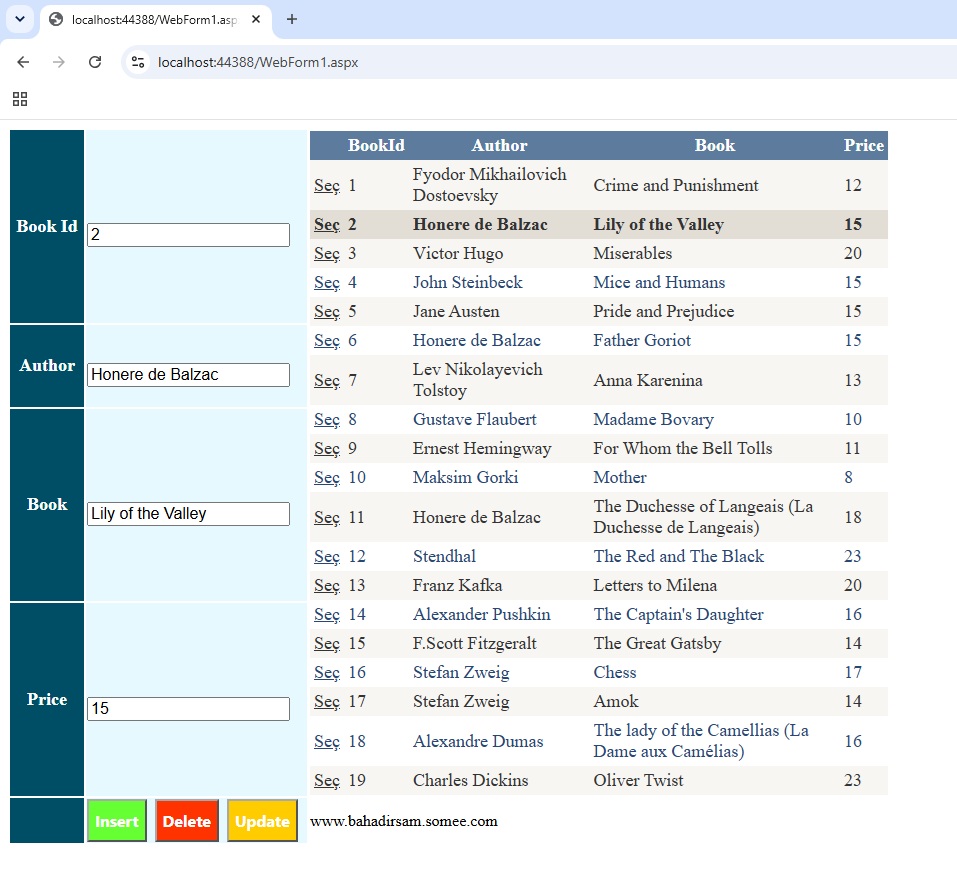
Şekil 1
WebForm1.aspx.cs
using MySql.Data.MySqlClient;
using System;
using System.Collections.Generic;
using System.Data;
using System.Data.OleDb;
using System.Linq;
using System.Web;
using System.Web.UI;
using System.Web.UI.WebControls;
namespace gridview_mysql_select_insert_update
{
public partial class WebForm1 : System.Web.UI.Page
{
MySqlConnection con = new MySqlConnection("Server=localhost;Database=mysql_db;Uid=root;Pwd='2344*';AllowUserVariables=True;UseCompression=True;");
MySqlDataAdapter da;
MySqlCommand cmd;
DataTable dt;
protected void Page_Load(object sender, EventArgs e)
{
string sql = "Select * From worldclassic";
da = new MySqlDataAdapter(sql, con);
dt = new DataTable();
con.Open();
da.Fill(dt);
con.Close();
GridView1.DataSource = dt;
GridView1.DataBind();
}
protected void GridView1_SelectedIndexChanged(object sender, EventArgs e)
{
txtId.Text = HttpUtility.HtmlDecode(GridView1.SelectedRow.Cells[1].Text);
txtAuthor.Text = HttpUtility.HtmlDecode(GridView1.SelectedRow.Cells[2].Text);
txtBook.Text = HttpUtility.HtmlDecode(GridView1.SelectedRow.Cells[3].Text);
txtPrice.Text = HttpUtility.HtmlDecode(GridView1.SelectedRow.Cells[4].Text);
}
protected void btnInsert_Click(object sender, EventArgs e)
{
string sql = "INSERT INTO worldclassic (Id, Author, Book, Price) VALUES (@id, @author, @book, @price)";
cmd = new MySqlCommand(sql, con);
cmd.Parameters.AddWithValue("@id", txtId.Text);
cmd.Parameters.AddWithValue("@author", txtAuthor.Text);
cmd.Parameters.AddWithValue("@book", txtBook.Text);
cmd.Parameters.AddWithValue("@price", txtPrice.Text);
con.Open();
cmd.ExecuteNonQuery();
con.Close();
Response.Redirect("WebForm1.aspx");
}
protected void btnDelete_Click(object sender, EventArgs e)
{
string sql = "Delete From worldclassic Where Id=@id";
cmd = new MySqlCommand(sql, con);
cmd.Parameters.AddWithValue("@id", txtId.Text);
con.Open();
cmd.ExecuteNonQuery();
con.Close();
Response.Redirect("WebForm1.aspx");
}
protected void btnUpdate_Click(object sender, EventArgs e)
{
string sql = "Update worldclassic Set Author=@author, Book=@book, Price=@price Where Id=@id";
cmd = new MySqlCommand(sql, con);
cmd.Parameters.AddWithValue("@id", txtId.Text);
cmd.Parameters.AddWithValue("@author", txtAuthor.Text);
cmd.Parameters.AddWithValue("@book", txtBook.Text);
cmd.Parameters.AddWithValue("@price", txtPrice.Text);
con.Open();
cmd.ExecuteNonQuery();
con.Close();
Response.Redirect("WebForm1.aspx");
}
}
}
WebForm1.aspx
<%@ Page Language="C#" AutoEventWireup="true" CodeBehind="WebForm1.aspx.cs" Inherits="gridview_mysql_select_insert_update.WebForm1" %>
<!DOCTYPE html>
<html xmlns="http://www.w3.org/1999/xhtml">
<head runat="server">
<title></title>
<style type="text/css">
.auto-style1 {
width: 100%;
}
.auto-style2 {
width: 72px;
color:white;
background:#004d66;
font-size: large;
font-weight: bold;
text-align: center;
}
.auto-style3 {
width: 219px;
background:#e6f9ff;
}
.auto-style4 {
width: 72px;
color:white;
font-size: large;
background: #004d66;
font-weight: bold;
height: 80px;
text-align: center;
}
.auto-style5 {
width: 219px;
background: #e6f9ff;
height: 80px;
}
</style>
</head>
<body>
<form id="form1" runat="server">
<div>
<table class="auto-style1">
<tr>
<td class="auto-style2">Book Id</td>
<td class="auto-style3">
<asp:TextBox ID="txtId" runat="server" Font-Size="Medium"></asp:TextBox>
</td>
<td rowspan="4">
<asp:GridView ID="GridView1" runat="server"
AutoGenerateColumns="False" CellPadding="4" ForeColor="#333333"
GridLines="None" Height="315px" Width="578px" AutoGenerateSelectButton="True" OnSelectedIndexChanged="GridView1_SelectedIndexChanged" Font-Size="Large">
<AlternatingRowStyle BackColor="White" ForeColor="#284775" />
<Columns>
<asp:BoundField DataField="Id" HeaderText="BookId" />
<asp:BoundField DataField="Author" HeaderText="Author" />
<asp:BoundField DataField="Book" HeaderText="Book" />
<asp:BoundField DataField="Price" HeaderText="Price" />
</Columns>
<EditRowStyle BackColor="#999999" />
<FooterStyle BackColor="#5D7B9D" Font-Bold="True" ForeColor="White" />
<HeaderStyle BackColor="#5D7B9D" Font-Bold="True" ForeColor="White" />
<PagerStyle BackColor="#284775" ForeColor="White" HorizontalAlign="Center" />
<RowStyle BackColor="#F7F6F3" ForeColor="#333333" />
<SelectedRowStyle BackColor="#E2DED6" Font-Bold="True" ForeColor="#333333" />
<SortedAscendingCellStyle BackColor="#E9E7E2" />
<SortedAscendingHeaderStyle BackColor="#506C8C" />
<SortedDescendingCellStyle BackColor="#FFFDF8" />
<SortedDescendingHeaderStyle BackColor="#6F8DAE" />
</asp:GridView>
</td>
</tr>
<tr>
<td class="auto-style4">Author</td>
<td class="auto-style5">
<asp:TextBox ID="txtAuthor" runat="server" Font-Size="Medium"></asp:TextBox>
</td>
</tr>
<tr>
<td class="auto-style2">Book</td>
<td class="auto-style3">
<asp:TextBox ID="txtBook" runat="server" Font-Size="Medium"></asp:TextBox>
</td>
</tr>
<tr>
<td class="auto-style2">Price</td>
<td class="auto-style3">
<asp:TextBox ID="txtPrice" runat="server" Font-Size="Medium"></asp:TextBox>
</td>
</tr>
<tr>
<td class="auto-style2"> </td>
<td class="auto-style3">
<asp:Button ID="btnInsert" runat="server" Text="Insert" OnClick="btnInsert_Click" BackColor="#66FF33" Font-Bold="True" Font-Names="Segoe UI" Font-Size="Medium" ForeColor="White" Height="43px" />
<asp:Button ID="btnDelete" runat="server" Text="Delete" OnClick="btnDelete_Click" BackColor="#FF3300" Font-Bold="True" Font-Names="Segoe UI" Font-Size="Medium" ForeColor="White" Height="43px" />
<asp:Button ID="btnUpdate" runat="server" Text="Update" OnClick="btnUpdate_Click" BackColor="#FFCC00" Font-Bold="True" Font-Names="Segoe UI" Font-Size="Medium" ForeColor="White" Height="43px" />
</td>
<td>www.bahadirsam.somee.com</td>
</tr>
</table>
</div>
</form>
</body>
</html>
Bir makalenin daha sonuna geldik. Bir sonraki makalede görüşmek üzere. Bahadır ŞAHİN