

MySql Veritabanına Kayıt Ekleme
Merhaba arkadaşlar bu makalemizde MySql veritabanına textBox a girilen verileri kaydedeceğiz. Formumuza 3 adet textBox ve 1 adet Button ekliyoruz.
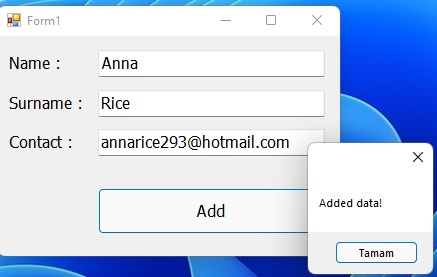
Şekil 1
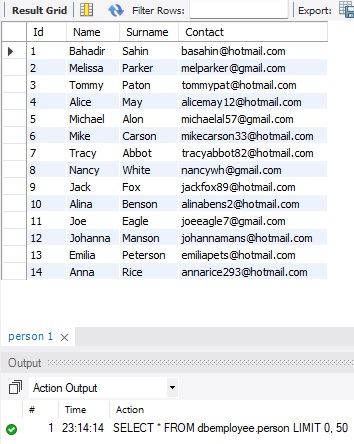
Şekil 2
Form1.cs
using System;
using System.Collections.Generic;
using System.ComponentModel;
using System.Data;
using System.Drawing;
using System.Linq;
using System.Text;
using System.Threading.Tasks;
using System.Windows.Forms;
using MySql.Data;
using MySql.Data.MySqlClient;
namespace mysql_insert
{
public partial class Form1 : Form
{
public Form1()
{
InitializeComponent();
}
public bool Adddata(int id, string name, string surname, string contact)
{
try
{
MySqlConnection con = new MySqlConnection("Server=localhost;Database=dbemployee;Uid=root;Pwd='2344';AllowUserVariables=True;UseCompression=True;");
con.Open();
string sqlStr = "Insert into person(Id,Name,Surname,Contact) Values('" + id + "','" + name + "', '" + surname + "', '" + contact + "')";
MySqlCommand cmd = new MySqlCommand(sqlStr, con);
cmd.ExecuteNonQuery();
return true;
//Veritabanına veriler eklenirse "true" değeri gönderecek
}
catch (Exception)
{
return false;
//Veriler eklenmezse "false" değeri dönecek
}
}
private void btnAdd_Click(object sender, EventArgs e)
{
int id;
MySqlConnection con = new MySqlConnection("Server=localhost;Database=dbemployee;Uid=root;Pwd='2344';AllowUserVariables=True;UseCompression=True;");
con.Open();
MySqlCommand cmd = new MySqlCommand("Select * From person", con);
MySqlDataAdapter da = new MySqlDataAdapter(cmd);
DataSet ds = new DataSet();
da.Fill(ds);
//veritabanindaki toplam kayit sayisini 1 artiriyoruz.
id = ds.Tables[0].Rows.Count+1;
con.Close();
bool result = Adddata(id,textBox1.Text, textBox2.Text, textBox3.Text);
if (result == true)
{
MessageBox.Show("Added data!");
}
else
{
MessageBox.Show("Error!");
}
}
}
}
Bir makalenin daha sonuna geldik. Bir sonraki makalede görüşmek üzere. Bahadır ŞAHİN