

GridView Nesnesinde Scroll Kullanımı
Merhaba arkadaşlar bu makalemizde GridView nesnesinde scroll nasıl kullanıra örnek vereceğiz. GridView nesresine yatay scroll ekleyeceğiz. Bunun için jquery.min.js ve ScrollableGridPlugin.js javascriptlerini kullanacağız.
Sayfamıza 1 adet scriptmanager, updatepanel, gridview ve button ekliyoruz.
Bu örneğimizde Mysql veritabanındaki verileri GridView da yatay scroll ile birlikte gösterimini sağlayacağız. Yatay scroll ile yukarı GridView satırları arasında dolaşabileceğiz. Refresh butonu ile ilk kayıda tekrar gidebileceğiz.
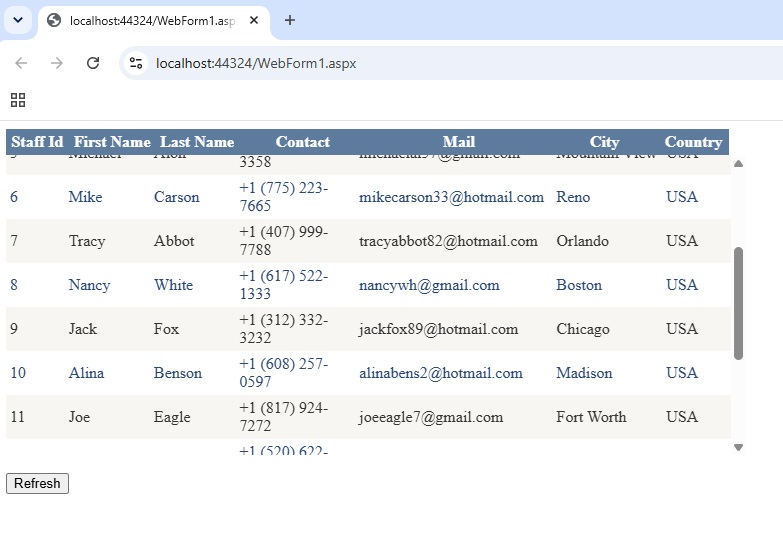
Şekil 1
WebForm1.aspx.cs
using MySql.Data;
using MySql.Data.MySqlClient;
using System;
using System.Collections.Generic;
using System.Data;
using System.Linq;
using System.Security.Cryptography;
using System.Web;
using System.Web.UI;
using System.Web.UI.WebControls;
namespace gridview_scrollable
{
public partial class WebForm1 : System.Web.UI.Page
{
DataTable dt;
protected void Page_Load(object sender, EventArgs e)
{
if (!this.IsPostBack)
{
try
{
MySqlConnection con = new MySqlConnection("Server=localhost;Database=mysql_db;Uid=root;Pwd='2344*';AllowUserVariables=True;UseCompression=True;");
con.Open();
string query = "Select * from staff3";
MySqlCommand command = new MySqlCommand(query, con);
MySqlDataAdapter ad = new MySqlDataAdapter(command);
dt = new System.Data.DataTable();
ad.Fill(dt);
gvCustomers.DataSource = dt;
gvCustomers.DataBind();
}
catch (Exception ex)
{
Response.Write(ex.Message + " An error occurred.Try again! Hata olustu. Tekrar deneyiniz!");
}
}
}
}
}
WebForm1.aspx
<%@ Page Language="C#" AutoEventWireup="true" CodeBehind="WebForm1.aspx.cs" Inherits="gridview_scrollable.WebForm1" %>
<!DOCTYPE html>
<html xmlns="http://www.w3.org/1999/xhtml">
<head runat="server">
<title></title>
<script type="text/javascript" src="https://cdnjs.cloudflare.com/ajax/libs/jquery/3.7.1/jquery.min.js"></script>
<script type="text/javascript" src="js/jquery.min.js"></script>
<script type="text/javascript" src="js/ScrollableGridPlugin.js"></script>
<script type="text/javascript">
$(function () {
$('#<%= gvCustomers.ClientID %>').Scrollable({
ScrollHeight: 300,
IsInUpdatePanel: true
});
});
</script>
</head>
<body>
<form id="form1" runat="server">
<div>
<asp:ScriptManager ID="ScriptManager1" runat="server"></asp:ScriptManager>
<asp:UpdatePanel ID="UpdatePanel1" runat="server">
<ContentTemplate>
<asp:GridView ID="gvCustomers" runat="server" AutoGenerateColumns="False" CellPadding="4" ForeColor="#333333" GridLines="None">
<AlternatingRowStyle BackColor="White" ForeColor="#284775" />
<Columns>
<asp:BoundField DataField="Id" HeaderText="Staff Id" />
<asp:BoundField DataField="FirstName" HeaderText="First Name" />
<asp:BoundField DataField="LastName" HeaderText="Last Name" />
<asp:BoundField DataField="Contact" HeaderText="Contact" />
<asp:BoundField DataField="Mail" HeaderText="Mail" />
<asp:BoundField DataField="City" HeaderText="City" />
<asp:BoundField DataField="Country" HeaderText="Country" />
</Columns>
<EditRowStyle BackColor="#999999" />
<FooterStyle BackColor="#5D7B9D" Font-Bold="True" ForeColor="White" />
<HeaderStyle BackColor="#5D7B9D" Font-Bold="True" ForeColor="White" />
<PagerStyle BackColor="#284775" ForeColor="White" HorizontalAlign="Center" />
<RowStyle BackColor="#F7F6F3" ForeColor="#333333" />
<SelectedRowStyle BackColor="#E2DED6" Font-Bold="True" ForeColor="#333333" />
<SortedAscendingCellStyle BackColor="#E9E7E2" />
<SortedAscendingHeaderStyle BackColor="#506C8C" />
<SortedDescendingCellStyle BackColor="#FFFDF8" />
<SortedDescendingHeaderStyle BackColor="#6F8DAE" />
</asp:GridView>
<br />
<asp:Button ID="btnRefresh" runat="server" Text="Refresh" />
</ContentTemplate>
</asp:UpdatePanel>
</div>
</form>
</body>
</html>
Bir makalenin daha sonuna geldik. Bir sonraki makalede görüşmek üzere. Bahadır ŞAHİN