

MS SQL Stored Procedure Kullanımı
Merhaba arkadaşlar bu makalemizde MS Sql database de Stored Procedure kullanımına örnek vereceğiz.
Formumuza 4 adet textBox, Label ve 1 adet button ekliyoruz. textBox a girilen veriyi Stored Procedure metodunu kullanarak Sql database e kaydediyoruz.
Bu örneğimizde MS Sql de System Databases altındaki master database in Programmability kısmındaki Stored Procedure kısmına aşağıdaki gibi yeni bir Stored Procedure ekliyoruz.
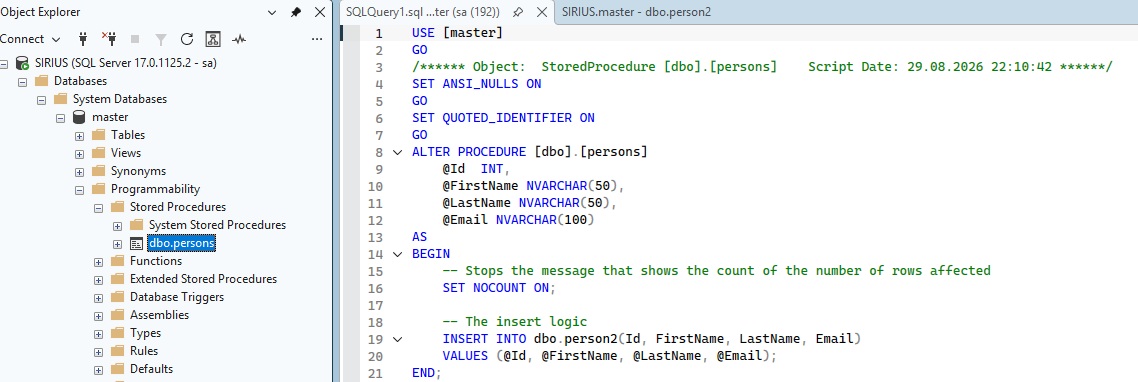
Şekil 1
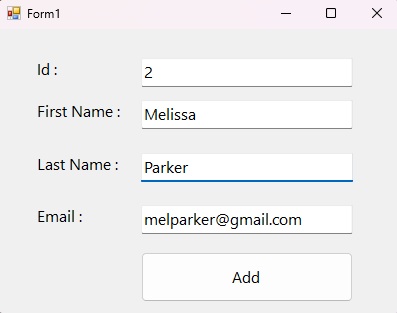
Şekil 2
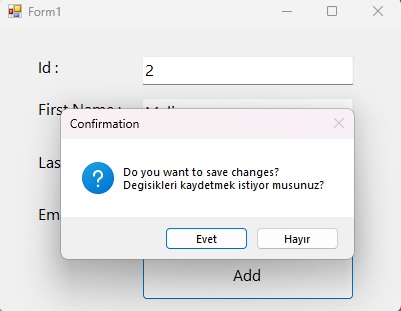
Şekil 3
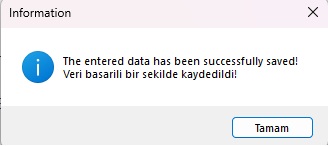
Şekil 4
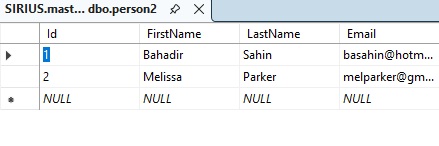
Şekil 5
Form1.cs
using System;
using System.Collections.Generic;
using System.ComponentModel;
using System.Data;
using System.Data.SqlClient;
using System.Drawing;
using System.Linq;
using System.Text;
using System.Threading.Tasks;
using System.Windows.Forms;
namespace stored_procedure_mssql
{
public partial class Form1 : Form
{
public Form1()
{
InitializeComponent();
}
int rowCount;
void count()
{
string conn = "Data Source = SIRIUS; Initial Catalog = master; User ID = sa; Password = 2344*; Integrated Security = true;";
using (SqlConnection con = new SqlConnection(conn))
{
con.Open();
string sql = "SELECT COUNT(*) FROM dbo.person2";
using (SqlCommand cmd = new SqlCommand(sql, con))
{
rowCount = Convert.ToInt32(cmd.ExecuteScalar());
rowCount++;
txtId.Text = rowCount.ToString();
}
con.Close();
}
}
void bindData()
{
SqlConnection con = new SqlConnection("Data Source = SIRIUS; Initial Catalog = master; User ID = sa; Password = 2344 *; Integrated Security = true; ");
SqlCommand cmd = new SqlCommand();
DialogResult result = MessageBox.Show("Do you want to save changes?" + (char)10 + "Degisikleri kaydetmek istiyor musunuz?", "Confirmation", MessageBoxButtons.YesNo, MessageBoxIcon.Question);
// Check the user's response
if (result == DialogResult.Yes)
{
// Code to execute if the user clicked Yes
con.Open();
cmd.Connection = con;
cmd.CommandType = CommandType.StoredProcedure;
cmd.CommandText = "dbo.persons"; //Stored Procedure name
cmd.Parameters.Add("FirstName", SqlDbType.NVarChar, 50).Value = txtFirstName.Text; //Parameters in the stored procedure
cmd.Parameters.Add("LastName", SqlDbType.NVarChar, 50).Value = txtLastName.Text;
cmd.Parameters.Add("Email", SqlDbType.NVarChar, 50).Value = txtMail.Text;
cmd.Parameters.Add("Id", SqlDbType.Int).Value = Convert.ToInt32(txtId.Text);
cmd.ExecuteNonQuery();
con.Close();
MessageBox.Show("The entered data has been successfully saved!" + (char)10 + "Veri basarili bir sekilde kaydedildi!", "Information",MessageBoxButtons.OK,MessageBoxIcon.Information);
txtFirstName.Text = string.Empty;
txtLastName.Text = string.Empty;
txtMail.Text = string.Empty;
}
else if (result == DialogResult.No)
{
// Code to execute if the user clicked No
MessageBox.Show("No data was saved!" + (char)10 + "Veri kaydedilmedi!", "Information", MessageBoxButtons.OK, MessageBoxIcon.Information);
txtFirstName.Text=string.Empty;
txtLastName.Text = string.Empty;
txtMail.Text = string.Empty;
}
}
private void btnAdd_Click(object sender, EventArgs e)
{
bindData();
count();
}
private void Form1_Load(object sender, EventArgs e)
{
count();
}
}
}
Bir makalenin daha sonuna geldik. Bir sonraki makalede görüşmek üzere. Bahadır ŞAHİN