

Query String Metodu Kullanılarak Seçilen Kayıdı Sql Veritabanından Silmek
Merhaba arkadaşlar bu makalemizde sql veritabanındaki seçili kayıdı 2. sayfadaki textbox nesneleri içerisinde gösteriyoruz.
Bu örneğimizde, QueryString methodu ile seçili kayıdın Id no’sunu arama çubuğundaki AuthorId kısmından alıyoruz. Sayfamıza eklediğimiz butonda AuthorId ye göre silme işlemini gerçekleştiriyoruz.
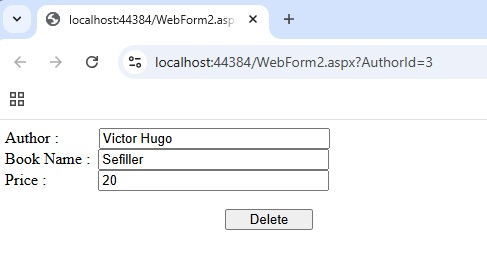
Şekil 1
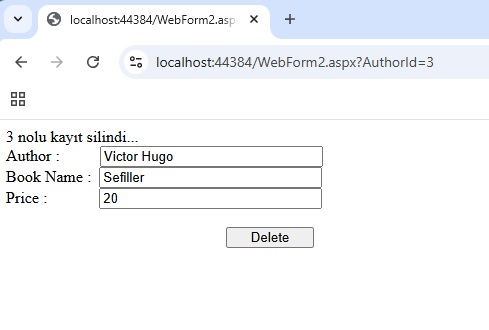
Şekil 2
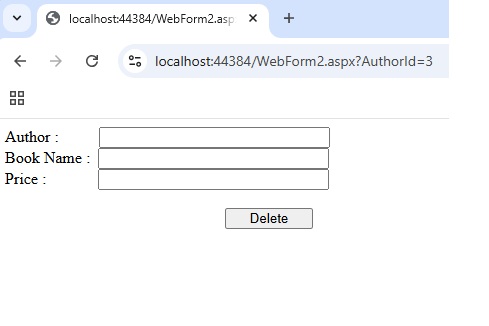
Şekil 3
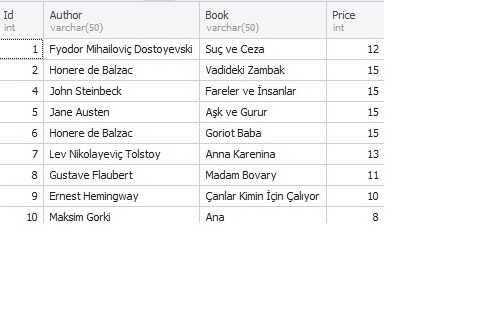
Şekil 4
WebForm1.aspx.cs
using System;
using System.Collections;
using System.Collections.Generic;
using System.Data;
using System.Data.SqlClient;
using System.Linq;
using System.Threading;
using System.Web;
using System.Web.UI;
using System.Web.UI.WebControls;
namespace aspnet_textbox_sql
{
public partial class WebForm1 : System.Web.UI.Page
{
protected void Page_Load(object sender, EventArgs e)
{
Response.Redirect("WebForm2.aspx?AuthorId=" + 3);
}
}
}
WebForm1.aspx
<%@ Page Language="C#" AutoEventWireup="true" CodeBehind="WebForm1.aspx.cs" Inherits="aspnet_textbox_sql.WebForm1" %>
<!DOCTYPE html>
<html xmlns="http://www.w3.org/1999/xhtml">
<head runat="server">
<title></title>
</head>
<body>
<form id="form1" runat="server">
<div>
<br />
<br />
<br />
<br />
</div>
</form>
</body>
</html>
WebForm2.aspx.cs
using System;
using System.Collections.Generic;
using System.Data;
using System.Data.SqlClient;
using System.Linq;
using System.Web;
using System.Web.UI;
using System.Web.UI.WebControls;
namespace aspnet_textbox_sql
{
public partial class WebForm2 : System.Web.UI.Page
{
protected void Page_Load(object sender, EventArgs e)
{
if (!IsPostBack)
{
bindData();
}
}
private void bindData()
{
SqlConnection con = new SqlConnection("Data Source=Sirius;Initial Catalog=master;User ID=sa;Password=2344*;Integrated Security=true");
con.Open();
SqlCommand cmd = new SqlCommand("Select * From dbo.worldclassics Where Id ='" + Convert.ToInt32(Request.QueryString["AuthorId"]) + "'" , con);
SqlDataAdapter da = new SqlDataAdapter(cmd);
DataSet ds = new DataSet();
da.Fill(ds);
SqlDataReader data = cmd.ExecuteReader();
while (data.Read())
{
TextBox1.Text = data[1].ToString();
TextBox2.Text = data[2].ToString();
TextBox3.Text = data[3].ToString();
}
con.Close();
}
protected void btnDelete_Click(object sender, EventArgs e)
{
SqlConnection con = new SqlConnection("Data Source=Sirius;Initial Catalog=master;User ID=sa;Password=2344*;Integrated Security=true");
con.Open();
SqlCommand cmd = new SqlCommand("Delete From dbo.worldclassics Where Id ='" + Convert.ToInt32(Request.QueryString["AuthorId"]) + "'", con);
SqlDataAdapter da = new SqlDataAdapter(cmd);
DataSet ds = new DataSet();
da.Fill(ds);
con.Close() ;
Response.Write(Request.QueryString["AuthorId"] + " nolu kayıt silindi...");
}
}
}
WebForm2.aspx
<%@ Page Language="C#" AutoEventWireup="true" CodeBehind="WebForm2.aspx.cs" Inherits="aspnet_textbox_sql.WebForm2" %>
<!DOCTYPE html>
<html xmlns="http://www.w3.org/1999/xhtml">
<head runat="server">
<title></title>
</head>
<body>
<form id="form1" runat="server">
<div>
<asp:Label ID="Label1" runat="server" Text="Author :"></asp:Label>
<asp:TextBox ID="TextBox1" runat="server" Width="223px"></asp:TextBox>
<br />
<asp:Label ID="Label2" runat="server" Text="Book Name :"></asp:Label>
<asp:TextBox ID="TextBox2" runat="server" Width="223px"></asp:TextBox>
<br />
<asp:Label ID="Label3" runat="server" Text="Price :"></asp:Label>
<asp:TextBox ID="TextBox3" runat="server" Width="223px"></asp:TextBox>
<br />
<br />
<asp:Button ID="btnDelete" runat="server" OnClick="btnDelete_Click" Text="Delete" Width="88px" />
</div>
</form>
</body>
</html>
Bir makalenin daha sonuna geldik. Bir sonraki makalede görüşmek üzere. Bahadır ŞAHİN